Project Details
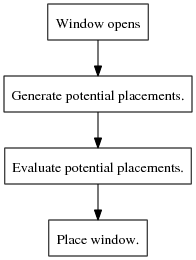
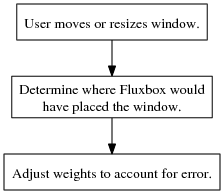
My treatment of this problem consists of two distinct parts: 1) deciding on a placement when a window opens and 2) adjusting the decision process when the user moves or resizes a window. Below I present system diagrams for these two processes, and complete explanations follow them.
System Diagrams
| Deciding on window placement. | Adjusting the decision process. |
 |
 |
Descriptions
Deciding on window placement.
Window opens.
Fluxbox receives a notification from X11 that a program is requesting to open a window. If the window is to be shown on the current workspace, Fluxbox will decide where to place the window.
Generate potential placements.
In order to find the best placement for the window, a list of candidates is generated. Each candidate consists of the location in pixels of the left, right, top, and bottom edges of the window. To generate positions, we first choose one corner of the window. We consider all places on the screen where this corner could line up with the edges of other windows or the edges of the screen. We also include all locations where this corner has been placed in the past by the user. The other two edges of the window are chosen to make the width and height of the window agree either with the program specified height or a width and height that the user has previously chosen for this window. This process is repeated for each corner of the window.
Evaluate potential placements.
Evaluating a placement consists of two steps: 1) compare the placement to those previously chosen by the user for this window and take a weighted sum of the distances, and 2) compute the overlap with all other windows and portions of the desktop, and take a weighted sum.
For each window, we keep a list of previous locations chosen by the user for the left, right, bottom, and top edges, and also for the width and height. Each of these values is associated with a weight that indicates how often the user has placed the window in that vicinity. When evaluating a placement, we compare the location of each edge to previous locations, take the distance, and use the associated weight to multiply the distance. We repeat this process for the width and height. Adding all of these together gives a measure of how far the placement is from the user's previous decisions.
For each window, we also associate a weight that indicates a penalty for overlapping that window. In addition to these, we divide the desktop into 32x32 pixel squares and associate a similar weight to each of them. When evaluating a placement, we iterate through the list of all open windows and all of the desktop squares, compute the overlap, and multiply by the associated weights. Adding all of these together gives a measure of how much the placement overlaps important parts of the screen.
The final evaluation is simply the sum of these two results. This value indicates how far the placement is from the user's preferences. Thus, the goal is to choose the placement that minimizes this value.
Place window.
After evaluating all of the candidates, we choose the best one and actually place the window on the screen.
Adjusting the decision process.
User moves or resizes window.
When the user attempts to move or resize a window, he is interacting with code in fluxbox that tracks the mouse location and calls X11 procedures to resize the window. When the user releases the mouse button, Fluxbox knows that the window is done being moved or resized, and uses this information to improve its decisions in the future.
Determine where Fluxbox would have placed the window.
The first step is to pretend that the window was just opened. Fluxbox calculates where it would have placed the window. This location, along with the placement that the user has chosen, will be used to adjust all of the relevant weights used to evaluate potential placements.
Adjust weights to account for error.
If the user moved the window, the new locations of the left, right, top, and bottom edges are recorded. If these locations have never been chosen before, the associated weight is initialized to 0, since that's effectively what has been used so far in evaluating placements. If the user resized the window, the new width and height are recorded, and the associated weights are initialized to 0 if necessary.
If an attribute changed, i.e. the locations of the left, right, top, or bottom edges or the width or height, the following process is used to update the weights. If the value is closer to the placement chosen by the user than to the one Fluxbox would have chosen, increase its weight. Otherwise, decrease it. Once all of the weights have been updated, we remove any locations or sizes whose weight has become 0.
For each open window and 32x32 pixel square on the desktop, calculate the overlap from both the placement chosen by the user and the one Fluxbox would have chosen. If the overlap was higher for the user's, then decrease the weight. Otherwise, increase it.
Choosing the learning rate is a matter of art, but I did make a few design decisions. My learning rates were relatively high, since I wanted Fluxbox to react quickly to new information and changing circumstances. For edge locations, widths, and heights, the rate is inversely proportional to the number of previously recorded placements, since a large number of these will indicate it's not important where the window is placed. Second, weights decrease faster than they increase, so that we adapt more quickly to a user changing his preferences. Third, I decided that overlapping windows should be learned faster than overlapping squares on the desktop. After all, if you really wanted to see something all the time, you shouldn't have put it on the desktop.